What Is the Model Context Protocol?
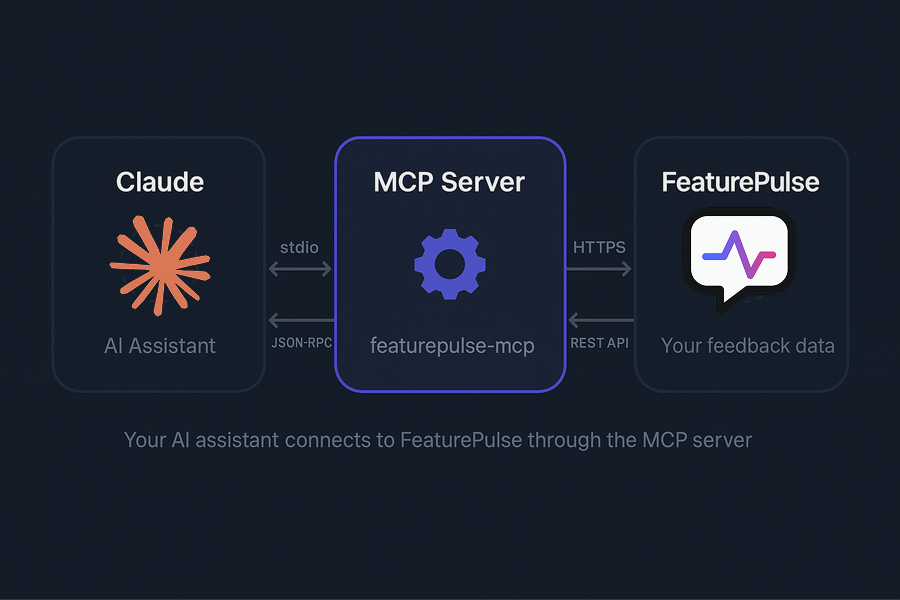
The Model Context Protocol (MCP) is an open standard that lets AI assistants connect to external tools and data sources. With the FeaturePulse MCP server, your AI assistant gets direct access to your feature request data — no copy-pasting, no context switching.
Available Tools
- list_feature_requests — Browse and filter all feature requests with full MRR data
- get_project_stats — High-level overview: total requests, votes, and MRR by status/priority
- search_feedback — Full-text search across feature requests
- analyze_feedback_by_group — Group requests by status or priority with aggregated MRR
- update_feature_status — Change status or priority of a feature request
Setup with Claude Code / Claude Desktop
For Claude Code, run this single command:
claude mcp add --transport stdio featurepulse \
  --scope user \
  --env FEATUREPULSE_API_KEY=<YOUR_API_KEY> \
  -- npx -y featurepulse-mcp
For Claude Desktop or other clients, add this to your config file (claude_desktop_config.json):
{
  "mcpServers": {
    "featurepulse": {
      "command": "npx",
      "args": ["-y", "featurepulse-mcp"],
      "env": {
        "FEATUREPULSE_API_KEY": "your-api-key-here"
      }
    }
  }
}
Setup with Cursor / Windsurf
Add the same MCP server configuration to your editor's MCP settings. Cursor and Windsurf both support the MCP standard — check their documentation for the config file location.
Example Prompts
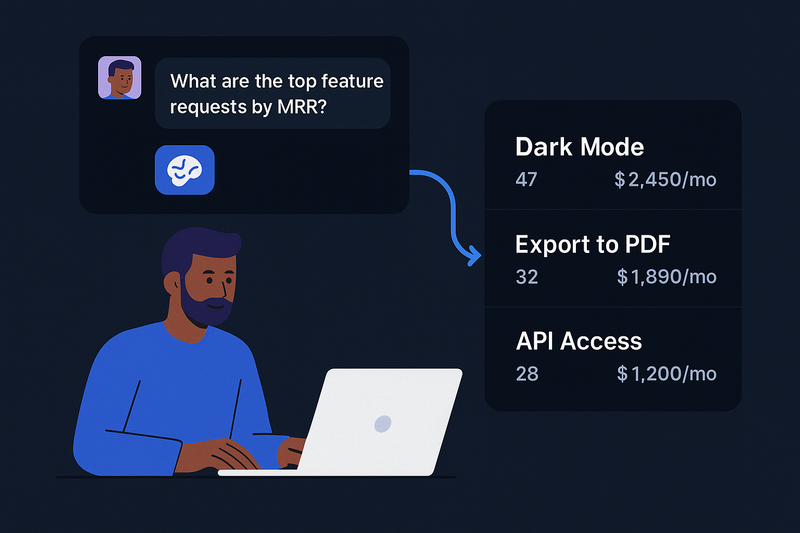
- "What are the top 5 feature requests by MRR impact?"
- "Show me all approved requests that aren't started yet"
- "How much MRR is behind high-priority pending requests?"
- "Search for feedback about dark mode"
- "Mark the dark mode request as in_progress"
Pair the MCP integration with GitHub integration for a powerful AI-driven workflow: analyze feature requests with Claude, then automatically create GitHub Issues for the ones you decide to build.