Why Typeform Isn't Built for Feature Requests
Typeform creates beautiful conversational surveys, and some teams use it to collect product feedback. But surveys are one-time submissions -- they don't give you an ongoing, prioritized backlog of feature requests. For structured feature request collection, you need a purpose-built tool.
One-Time Submissions vs Living Backlog
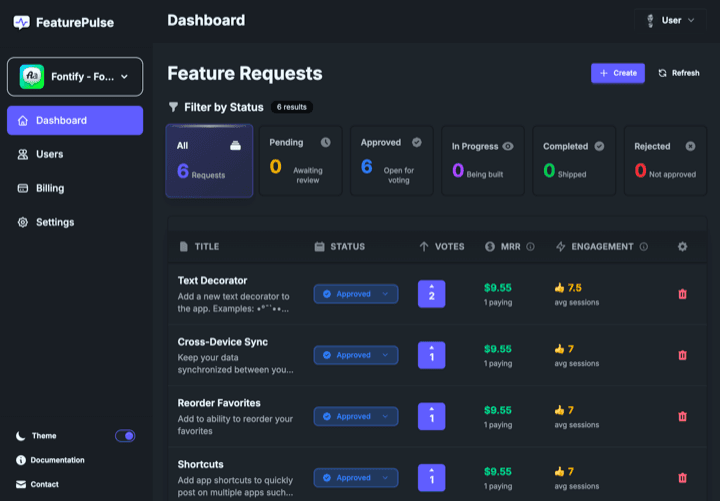
When a user submits a Typeform response, that data sits in a spreadsheet. There's no voting, no deduplication, no status tracking. With FeaturePulse, every feature request becomes part of a living backlog where users can vote, you can update statuses, and users get notified when you ship their request. This ongoing relationship helps reduce churn.
Voting and Revenue-Based Prioritization
Typeform has no voting mechanism. You'd need to manually aggregate responses to see which features are most requested. FeaturePulse provides built-in feature voting with MRR tracking, so you instantly see both demand and revenue impact for every request.
In-App Experience
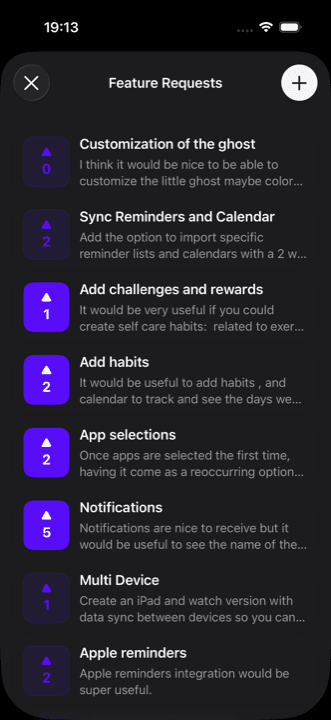
Typeform surveys are responsive web forms that open in a browser or web view. FeaturePulse's native SwiftUI SDK keeps users inside your app, which matters for iOS developers who care about a polished user experience.
When Typeform Makes Sense
Typeform excels at one-time surveys: onboarding questionnaires, NPS surveys, customer satisfaction polls. If you need structured survey data, Typeform is a great tool. But for ongoing feature request management with voting and prioritization, FeaturePulse is the right choice.
Conclusion
Typeform and FeaturePulse serve different purposes. Use Typeform for surveys and one-time data collection. Use FeaturePulse for ongoing feature request management with voting, prioritization, engagement tracking, and App Store review import.
Feature Comparison
| Feature | Typeform | FeaturePulse |
|---|---|---|
| Native iOS SDK | Responsive web forms | SwiftUI |
| Feature Voting | ||
| Ongoing Request Tracking | ||
| MRR Tracking | ||
| Engagement/Usage Tracking | Unique | |
| NPS/CSAT Surveys | ||
| Duplicate Detection | ||
| Status Notifications | ||
| App Store Reviews Import | AI-powered | |
| Purpose-Built for Feature Requests | ||
| Starting Price | Free (limited) / From $25/month | Free / $9/mo |
Why Choose FeaturePulse Over Typeform
Purpose-Built for Feature Requests
FeaturePulse is designed specifically for feature request collection and prioritization. Typeform is a generic survey tool that requires manual aggregation and analysis.
Ongoing Tracking vs One-Time Submissions
Typeform submissions are one-time events. FeaturePulse maintains an ongoing backlog where users can vote, you can update statuses, and users get notified of progress.
Voting & Prioritization
FeaturePulse supports structured voting with MRR weighting. With Typeform, you'd need to manually compile and deduplicate responses to understand priorities.
Native iOS SDK
FeaturePulse embeds natively in your iOS app. Typeform surveys are responsive web forms that open in a browser or web view.


Ready to Switch from Typeform?
Start collecting feature requests from your iOS users today. Free to get started, no credit card required.